
Introduction
Choosing the right Customer Relationship Management (CRM) system is crucial for your unique business needs, resources, and goals. One size doesn’t fit all, so it’s essential to find a CRM tailored to your specific requirements.
Running a small business, managing a marketing team, or working with a tight budget? There are CRM options for every need. Popular platforms like Zoho CRM offer diverse features, but selecting the right one requires more than just choosing a well-known name.
In this guide, we’ll delve into different CRM systems, their key features, and a step-by-step decision-making process to help you find the perfect CRM for your business.
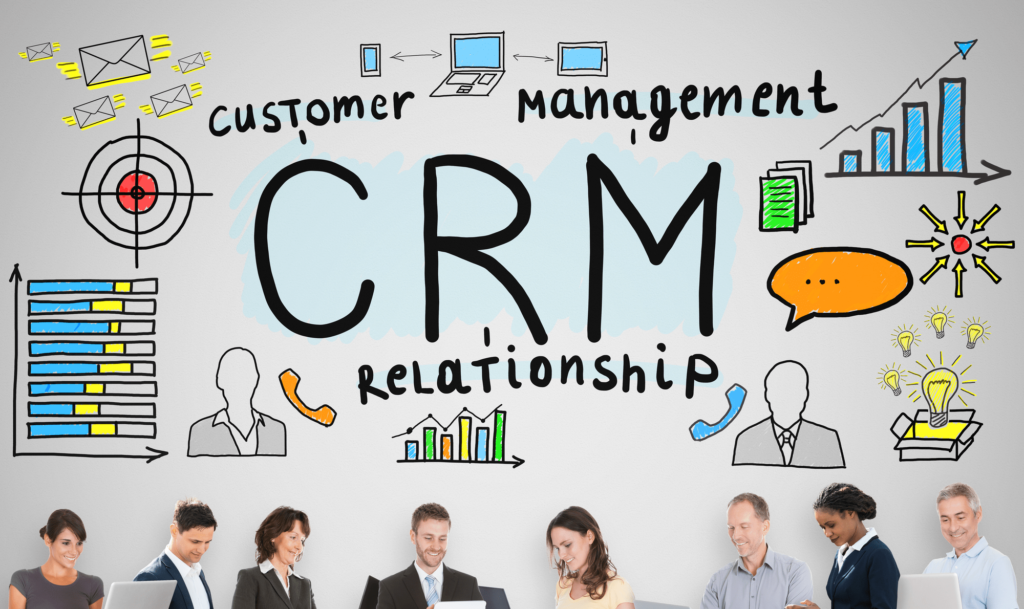
The Importance of a Tailored CRM Solution
Understanding Your Business Needs
Before exploring the myriad of CRM options available, it’s essential to pinpoint why your business requires a CRM system. The core objective of a CRM is to enhance customer relationships by automating and refining critical processes in sales, marketing, and customer service.
A well-chosen CRM can:
- Boost Sales and Customer Satisfaction: By automating routine tasks and providing a holistic view of customer interactions, a tailored CRM can significantly improve sales strategies and increase overall customer satisfaction.
- Provide Valuable Insights into Customer Behavior: Advanced CRM systems offer deep insights into customer preferences and behaviors, helping you make data-driven decisions and tailor your marketing efforts more effectively.
- Streamline Operations: A CRM solution designed for your specific business needs can streamline operations, reduce manual work, and ensure smoother workflows, ultimately enhancing productivity and efficiency.
Benefits of a CRM
Enhanced Customer Relationships
A CRM system centralizes detailed customer data, allowing you to personalize interactions and nurture stronger relationships. By having access to comprehensive customer profiles, you can tailor your communication and offers to meet individual preferences, leading to increased customer loyalty and engagement.
Automation of Sales and Marketing Processes
CRMs streamline and automate routine tasks such as data entry, follow-ups, and email campaigns. This automation not only saves time but also reduces the risk of errors, enabling your team to concentrate on strategic activities that drive growth. By automating these processes, you can ensure that your sales and marketing efforts are more efficient and effective.
Insightful Analytics
With a CRM, you gain access to powerful analytics that provide deep insights into customer behavior, preferences, and trends. This valuable data helps you make informed decisions, tailor your marketing strategies, and identify opportunities for growth. By understanding what drives your customers, you can craft more targeted campaigns and improve overall business performance.
Improved Customer Service
A CRM system offers comprehensive access to customer history and preferences, allowing you to deliver more personalized and efficient support. By having all relevant information at your fingertips, you can resolve issues faster and offer solutions that are better aligned with each customer’s needs, ultimately enhancing customer satisfaction and loyalty.
Efficient Collaboration
CRMs facilitate better communication and collaboration across departments by providing a centralized platform for sharing customer information and insights. This unified approach ensures that all team members are on the same page, leading to more cohesive customer management and improved overall efficiency. With everyone working from a single source of truth, your team can deliver a more consistent and effective customer experience.
Benefits of a CRM
- Enhanced Customer Relationships:
A CRM system centralizes detailed customer data, allowing you to personalize interactions and nurture stronger relationships. By having access to comprehensive customer profiles, you can tailor your communication and offers to meet individual preferences, leading to increased customer loyalty and engagement. - Automation of Sales and Marketing Processes:
CRMs streamline and automate routine tasks such as data entry, follow-ups, and email campaigns. This automation not only saves time but also reduces the risk of errors, enabling your team to concentrate on strategic activities that drive growth. By automating these processes, you can ensure that your sales and marketing efforts are more efficient and effective. - Insightful Analytics:
With a CRM, you gain access to powerful analytics that provide deep insights into customer behavior, preferences, and trends. This valuable data helps you make informed decisions, tailor your marketing strategies, and identify opportunities for growth. By understanding what drives your customers, you can craft more targeted campaigns and improve overall business performance. - Improved Customer Service:
A CRM system offers comprehensive access to customer history and preferences, allowing you to deliver more personalized and efficient support. By having all relevant information at your fingertips, you can resolve issues faster and offer solutions that are better aligned with each customer’s needs, ultimately enhancing customer satisfaction and loyalty. - Efficient Collaboration:
CRMs facilitate better communication and collaboration across departments by providing a centralized platform for sharing customer information and insights. This unified approach ensures that all team members are on the same page, leading to more cohesive customer management and improved overall efficiency. With everyone working from a single source of truth, your team can deliver a more consistent and effective customer experience.
Types of CRM Systems
CRM systems come in various types, each designed to cater to specific business needs and requirements. Here’s a detailed look at the main types of CRM systems, along with their pros and cons:
1. Operational CRM
Overview:
Operational CRM systems focus on automating and improving day-to-day business processes. They streamline sales, marketing, and customer service tasks to enhance efficiency and effectiveness.
Pros:
- Streamlined Processes: Automates routine tasks such as lead management, customer service requests, and marketing campaigns, reducing manual workload.
- Enhanced Efficiency: Improves productivity by providing tools for task automation and workflow management.
- Improved Customer Interaction: Facilitates better tracking and management of customer interactions and inquiries, leading to faster responses.
Cons:
- Limited Customization: May offer less flexibility in terms of customization compared to other CRM types.
- Potential Over-Reliance: Excessive automation may lead to a reduction in personal touch, potentially affecting customer relationships.
- Integration Challenges: May face difficulties integrating with other specialized tools or systems.
2. Analytical CRM
Overview:
Analytical CRM systems are designed to analyze customer data and generate insights that help in strategic decision-making. They focus on understanding customer behavior, preferences, and trends.
Pros:
- In-Depth Insights: Provides detailed analytics and reporting on customer behavior, allowing for data-driven decision-making.
- Enhanced Customer Understanding: Helps in segmenting customers and predicting future behavior, improving targeting strategies.
- Strategic Planning: Assists in crafting more effective marketing strategies and optimizing sales efforts based on data insights.
Cons:
- Complexity: Can be complex to set up and use, requiring specialized skills and training.
- Data Overload: Risk of being overwhelmed by large volumes of data and analytics, making it challenging to identify actionable insights.
- High Costs: Often comes with higher costs due to advanced features and analytics capabilities.
3. Collaborative CRM
Overview:
Collaborative CRM systems focus on improving communication and collaboration among different departments within an organization. They aim to ensure that all teams work together seamlessly to manage customer relationships.
Pros:
- Enhanced Team Collaboration: Facilitates better communication between departments, ensuring a unified approach to customer management.
- Improved Information Sharing: Provides a centralized platform for sharing customer information, reducing duplication of efforts and inconsistencies.
- Holistic View: Offers a comprehensive view of customer interactions across various touchpoints, leading to more coordinated service.
Cons:
- Implementation Complexity: Can be challenging to implement and require significant changes in internal processes and workflows.
- Potential Resistance: Teams may resist changes in workflow and communication practices, impacting the effectiveness of the system.
- Integration Issues: Might face difficulties integrating with other systems or tools used within the organization.
4. Campaign Management CRM
Overview:
Campaign Management CRM systems are designed to manage and optimize marketing campaigns. They focus on planning, executing, and analyzing marketing efforts to improve campaign effectiveness.
Pros:
- Campaign Optimization: Provides tools for designing, executing, and tracking marketing campaigns, leading to better ROI.
- Targeted Marketing: Helps in segmenting audiences and targeting them with personalized campaigns based on their behavior and preferences.
- Performance Tracking: Offers detailed analytics on campaign performance, enabling continuous improvement and adjustment.
Cons:
- Limited Scope: Primarily focused on marketing, which may not address other CRM needs such as sales and customer service.
- Potential Overemphasis: May lead to an overemphasis on marketing efforts at the expense of other critical areas like customer service.
- Resource Intensive: Requires dedicated resources and expertise to manage and optimize marketing campaigns effectively.
5. Sales CRM
Overview:
Sales CRM systems are tailored to manage and enhance the sales process. They focus on tracking sales activities, managing leads, and improving sales performance.
Pros:
- Sales Process Optimization: Provides tools for managing sales pipelines, tracking leads, and automating follow-ups, leading to increased sales efficiency.
- Lead Management: Helps in nurturing leads and converting them into customers through effective follow-up and engagement strategies.
- Performance Tracking: Offers insights into sales performance and metrics, enabling better forecasting and goal setting.
Cons:
- Narrow Focus: Primarily focused on sales activities, which may not address broader CRM needs such as customer service or marketing.
- Learning Curve: Sales teams may require training to effectively utilize the system’s features and capabilities.
- Cost: May come with higher costs due to advanced sales tracking and management features.
Each CRM type offers unique benefits and may have specific limitations depending on your business needs. Selecting the right CRM system involves assessing these factors to ensure it aligns with your objectives and enhances your overall customer relationship management strategy.
Key Considerations When Choosing a CRM
Selecting the right CRM (Customer Relationship Management) system is crucial for optimizing your business operations and enhancing customer interactions. Here are the key considerations to keep in mind when choosing a CRM:
1. Define Your Business Needs
Before diving into CRM options, it’s essential to clearly define your business needs. Consider factors such as:
- Business Size and Structure: Assess whether the CRM can scale with your business and support your organizational structure.
- Key Objectives: Identify your primary goals, whether it’s improving sales processes, enhancing customer service, or automating marketing campaigns.
Understanding your specific requirements will help you select a CRM that aligns with your strategic objectives and provides the functionalities you need.
2. Evaluate CRM Features and Capabilities
Different CRM systems offer varying features and capabilities. Ensure the CRM you choose includes:
- Contact Management: Efficiently organize and manage customer data and interactions.
- Sales Automation: Automate tasks such as lead tracking, follow-ups, and pipeline management.
- Marketing Automation: Manage and execute marketing campaigns, track their performance, and analyze results.
- Customer Service Tools: Provide support and manage customer inquiries, complaints, and service requests.
- Analytics and Reporting: Access detailed reports and insights to make data-driven decisions.
Select a CRM that offers the features that are most relevant to your business needs and can integrate seamlessly with your existing systems.
3. Consider Ease of Use
A CRM system should be user-friendly to ensure smooth adoption and minimize training time. Look for:
- Intuitive Interface: A clean and easy-to-navigate interface that simplifies tasks and workflows.
- Customizable Dashboards: Ability to personalize dashboards and views based on user roles and preferences.
- Training and Support: Availability of comprehensive training resources and responsive customer support.
Choosing a CRM with a user-friendly design will enhance productivity and ensure your team can effectively utilize the system.
4. Assess Integration Capabilities
Your CRM should integrate seamlessly with other tools and systems you use, such as:
- Email Platforms: Sync with email clients for efficient communication and tracking.
- ERP Systems: Integrate with Enterprise Resource Planning (ERP) systems to streamline business processes.
- Social Media: Connect with social media platforms to manage and track interactions.
- Accounting Software: Integrate with accounting tools to manage financial data and transactions.
Effective integration will enhance your CRM’s functionality and provide a cohesive experience across your business tools.
5. Evaluate Customization Options
Every business has unique processes and requirements. Look for a CRM that offers:
- Custom Fields and Modules: Ability to add custom fields and modules to capture specific data and manage unique workflows.
- Automation Rules: Set up automated workflows and rules to streamline repetitive tasks and processes.
- Scalability: Flexibility to adapt and expand as your business grows and your needs evolve.
A customizable CRM will allow you to tailor the system to fit your specific needs and processes, ensuring it remains relevant as your business changes.
6. Consider Costs and Pricing Models
Understand the cost structure of the CRM system, including:
- Subscription Fees: Monthly or annual subscription costs based on user count or features.
- Implementation Costs: Expenses related to setup, customization, and training.
- Additional Costs: Any extra fees for integrations, support, or additional features.
Compare pricing models and ensure the CRM fits within your budget while providing the features and support you need.
7. Check for Security and Compliance
Protecting your customer data is paramount. Ensure the CRM system offers:
- Data Encryption: Secure encryption protocols to protect data in transit and at rest.
- Access Controls: Role-based access controls to restrict data access based on user roles.
- Compliance: Adherence to industry standards and regulations, such as GDPR or CCPA, to ensure data privacy and protection.
Choosing a CRM with robust security features will help safeguard sensitive information and maintain compliance with regulatory requirements.
8. Read Reviews and Seek Recommendations
Before making a decision, research and review potential CRM systems:
- Customer Reviews: Read reviews and testimonials from other users to gauge satisfaction and performance.
- Case Studies: Examine case studies to see how the CRM has benefited similar businesses.
- Expert Recommendations: Seek advice from industry experts or consultants who can provide insights based on their experience.
Gathering feedback and recommendations will help you make an informed decision and choose a CRM that meets your needs.
By carefully considering these factors, you can select a CRM system that enhances your business operations, improves customer relationships, and supports your growth objectives.
Watch Our YouTube Video on CRM Best Practices
For a more detailed understanding of CRM best practices, check out our YouTube video on the same topic. In the video, we dive deep into each of the top 10 strategies for mastering CRM in 2024, providing practical examples and expert tips. Watch the video on our channel to gain valuable insights and see how these strategies can be effectively implemented in real-world scenarios. Don’t forget to like, comment, and subscribe for more informative content!
Popular CRM Solutions
Zoho CRM
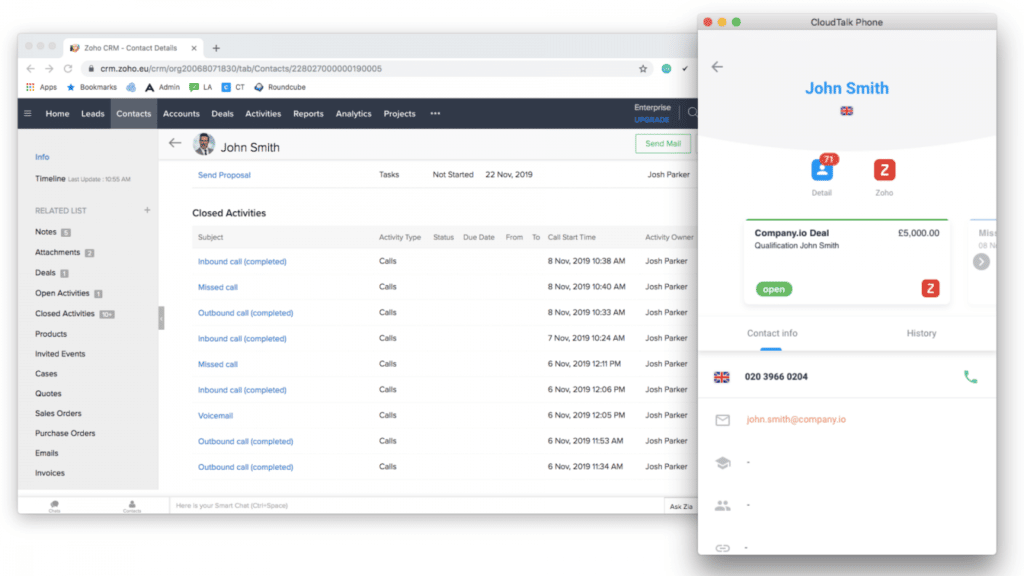
Zoho CRM is a versatile and widely-used CRM that offers a comprehensive suite of tools for sales, marketing, and customer service. It is known for its affordability and flexibility, making it suitable for businesses of all sizes.
Features:
- Contact and lead management
- Sales automation
- Marketing automation
- Customer service tools
- Analytics and reporting
Pros:
- Affordable pricing
- Wide range of features
- Highly customizable
Cons:
- May require significant setup time
- Advanced features may be complex for beginners
Salesforce CRM
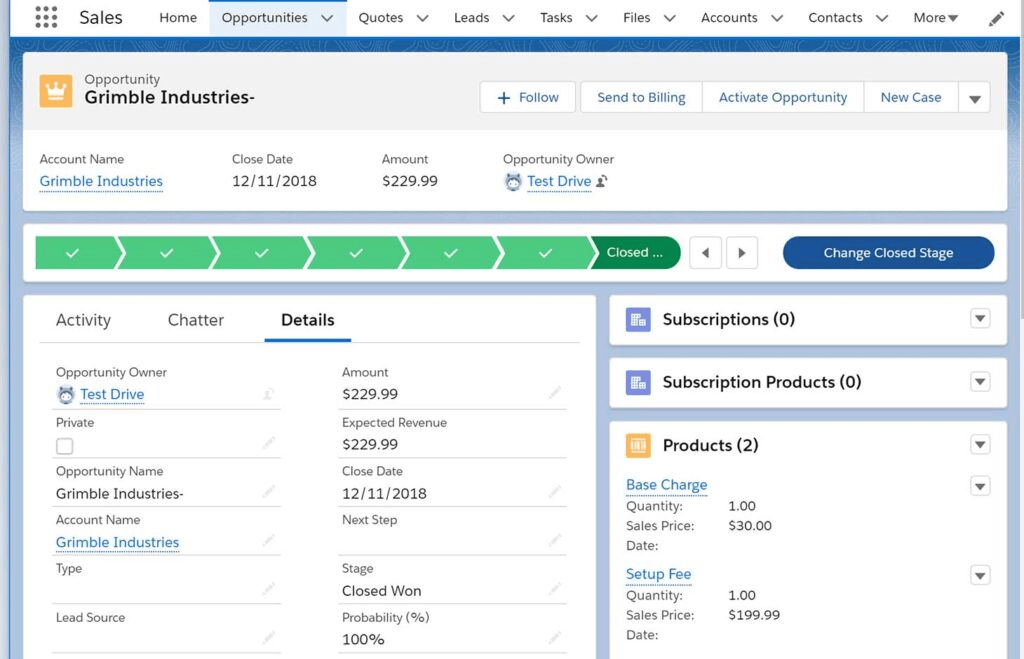
Salesforce CRM is a market leader known for its robust features and scalability. It is ideal for large enterprises and businesses with complex CRM needs.
Features:
- Comprehensive contact management
- Advanced sales and marketing automation
- Customizable dashboards and reports
- Extensive third-party integrations
- AI-powered insights
Pros:
- Highly scalable
- Wide range of advanced features
- Strong support and community
Cons:
- Expensive compared to other CRMs
- Steep learning curve
HubSpot CRM
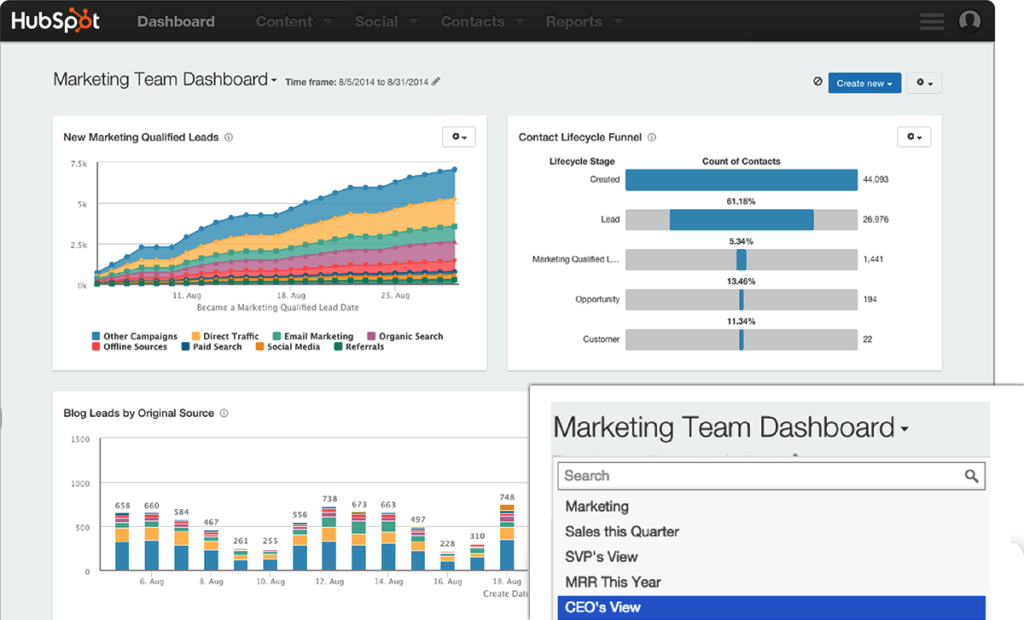
HubSpot CRM is a popular choice for small to medium-sized businesses. It offers a free version with essential features and paid versions with advanced functionalities.
Features:
- Contact and lead management
- Email tracking and automation
- Sales pipeline management
- Marketing tools
- Analytics and reporting
Pros:
- Free version available
- User-friendly interface
- Integrates well with other HubSpot tools
Cons:
- Limited advanced features in the free version
- Can become expensive as you scale
Pipedrive CRM
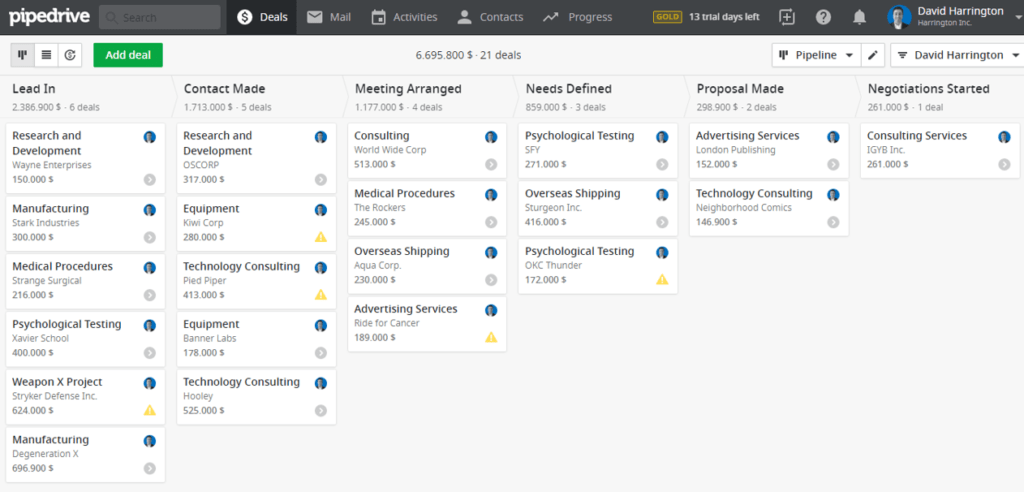
Pipedrive CRM is designed specifically for sales teams. It focuses on sales pipeline management and is known for its simplicity and ease of use.
Features:
- Sales pipeline management
- Contact and lead management
- Email integration
- Sales forecasting
- Reporting and analytics
Pros:
- User-friendly interface
- Strong focus on sales management
- Affordable pricing
Cons:
- Limited marketing and customer service features
- May not be suitable for large enterprises
Freshsales CRM
Freshsales CRM, part of the Freshworks suite, offers a range of features designed to support sales and customer management.
Features:
- Contact and lead management
- Email tracking and automation
- Sales pipeline management
- AI-based lead scoring
- Reporting and analytics
Pros:
- AI-powered features
- Easy to use
- Affordable pricing
Cons:
- Limited third-party integrations
- May require customization for advanced needs
Implementing Your Chosen CRM
Successfully implementing a CRM (Customer Relationship Management) system requires careful planning and execution. Here’s a step-by-step guide to help you navigate the implementation process:
1. Develop a Clear Implementation Plan
Create a detailed implementation plan outlining the steps and timeline for deploying the CRM. Your plan should include:
- Objectives and Goals: Define what you aim to achieve with the CRM implementation, such as improving sales processes or enhancing customer service.
- Timeline: Establish a realistic timeline for each phase of the implementation, including milestones and deadlines.
- Resources and Budget: Allocate resources, including personnel and budget, to support the implementation process.
A well-structured plan will ensure a smooth and organized CRM deployment.
2. Assemble a Project Team
Form a dedicated project team to oversee the CRM implementation. This team should include:
- Project Manager: Responsible for coordinating the implementation process and ensuring it stays on track.
- CRM Administrator: Manages the CRM system, including configuration and maintenance.
- IT Support: Handles technical aspects such as integrations and system setup.
- End Users: Representatives from various departments who will use the CRM and provide feedback.
Having a diverse team will help address various aspects of the implementation and ensure that all needs are met.
3. Customize and Configure the CRM
Customize the CRM to align with your business processes and requirements. This includes:
- Setting Up User Roles and Permissions: Define roles and permissions based on user responsibilities to control access to data and features.
- Configuring Fields and Modules: Customize fields, modules, and workflows to match your business needs.
- Integrating with Other Systems: Ensure the CRM integrates with existing tools, such as email platforms, ERP systems, and accounting software.
Proper configuration ensures that the CRM supports your specific processes and integrates seamlessly with other systems.
4. Data Migration
Plan and execute data migration from your existing systems to the new CRM. This process involves:
- Data Assessment: Review and clean your existing data to ensure accuracy and relevance.
- Data Mapping: Map data fields from your old system to the new CRM to ensure a smooth transfer.
- Migration Testing: Conduct test migrations to identify and resolve any issues before the final migration.
Effective data migration is crucial for maintaining data integrity and ensuring that all relevant information is transferred to the new system.
5. Train Your Team
Provide comprehensive training to ensure that all users are comfortable and proficient with the new CRM. Training should cover:
- System Overview: Basic navigation and features of the CRM.
- Role-Specific Training: In-depth training tailored to the specific roles and responsibilities of different users.
- Best Practices: Tips and best practices for using the CRM effectively.
Well-trained users are more likely to adopt the system successfully and utilize its features to their fullest potential.
6. Test the CRM
Conduct thorough testing to ensure that the CRM functions as expected. Testing should include:
- System Functionality: Verify that all features and functionalities work correctly.
- Integration Testing: Ensure that the CRM integrates properly with other systems and tools.
- User Acceptance Testing: Have end users test the system to confirm it meets their needs and expectations.
Testing helps identify and address any issues before the CRM goes live, ensuring a smoother transition.
7. Launch the CRM
Execute the official launch of the CRM, which involves:
- Finalizing Data Migration: Complete the final data migration and ensure all information is accurate and up-to-date.
- Go-Live Support: Provide support to address any issues or questions that arise during the initial launch phase.
- Communication: Inform all stakeholders about the launch and provide instructions for accessing and using the CRM.
A successful launch sets the stage for effective CRM usage and ensures that users are ready to start working with the new system.
8. Monitor and Optimize
Continuously monitor and optimize the CRM to ensure it continues to meet your business needs. This includes:
- Tracking Performance: Monitor system performance and user engagement to identify areas for improvement.
- Gathering Feedback: Collect feedback from users to address any issues and make necessary adjustments.
- Updating and Upgrading: Regularly update the CRM to benefit from new features and enhancements.
Ongoing monitoring and optimization help maximize the value of the CRM and ensure it evolves with your business needs.
9. Review and Adjust
Regularly review the CRM implementation and make adjustments as needed. This involves:
- Assessing Effectiveness: Evaluate how well the CRM is meeting your business objectives and identify areas for improvement.
- Adjusting Processes: Make changes to workflows and configurations based on user feedback and evolving needs.
- Revisiting Goals: Reassess your CRM goals and adjust them as necessary to align with your business strategy.
Reviewing and adjusting ensures that the CRM remains a valuable tool for your business and continues to support your objectives.
By following these steps, you can effectively implement your chosen CRM system, ensuring a smooth transition and maximizing its benefits for your organization.
Case Studies
Salesforce: Coca-Cola
Coca-Cola leveraged Salesforce to transform its sales and customer service processes. By centralizing customer data and streamlining communication, Coca-Cola enhanced its operational efficiency and responsiveness. The result was improved sales forecasting and higher customer satisfaction.
Zoho CRM: HDFC Bank
HDFC Bank implemented Zoho CRM to better manage customer relationships. With Zoho’s automation and tracking features, the bank improved its handling of customer queries and requests. This led to a more efficient service process and increased customer satisfaction.
HubSpot CRM: AirAsia
AirAsia used HubSpot CRM to boost customer engagement and refine its marketing strategies. By utilizing HubSpot’s tools for email marketing and lead management, AirAsia increased engagement rates and improved customer retention.
Microsoft Dynamics 365: HP Inc.
HP Inc. integrated Microsoft Dynamics 365 to unify its sales, marketing, and customer service functions. This CRM allowed HP to consolidate data, automate workflows, and gain valuable insights, resulting in enhanced sales performance and customer service.
Pipedrive: MedeAnalytics
MedeAnalytics adopted Pipedrive for its sales management needs. The intuitive interface and effective pipeline management features of Pipedrive enabled the company to track sales activities and manage leads more efficiently, leading to improved sales performance.
FAQs
What factors should I consider when selecting a CRM for my business?
Assess your business needs, budget, required features, scalability, and user-friendliness.
How can a CRM benefit my sales and marketing processes?
A CRM automates routine tasks, provides insightful analytics, and enhances customer interactions, leading to increased efficiency and improved results.
What are the key differences between Operational, Analytical, and Collaborative CRMs?
Operational CRMs focus on automating sales and service tasks, Analytical CRMs provide insights from customer data, and Collaborative CRMs enhance internal communication and teamwork.
How can I determine the total cost of ownership for a CRM?
Consider the costs of implementation, customization, subscription or purchase, ongoing maintenance, and any additional training required.
What is the importance of user-friendliness in a CRM system?
A user-friendly CRM ensures ease of use and adoption by your team, reducing training time and increasing overall effectiveness.
How do I ensure a successful CRM implementation?
Plan and prepare thoroughly, migrate data accurately, customize the system to fit your processes, and invest in training and onboarding for your team.
What are some common challenges in CRM implementation and how can I overcome them?
Common challenges include integration issues, user adoption, and data quality. Use integration tools, provide comprehensive training, and regularly clean and validate data to address these issues.
Can a CRM system scale with my business as it grows?
Ensure the CRM you choose is scalable and flexible, allowing it to accommodate increased data and users as your business expands.
How can CRM analytics help in making business decisions?
CRM analytics provide insights into customer behavior, preferences, and trends, which can inform strategic decisions and enhance marketing and sales strategies.
What are some popular CRM solutions and their key features?
Zoho CRM offers affordability and flexibility; Salesforce CRM is known for its scalability and advanced features; HubSpot CRM provides a strong free version; Pipedrive excels in sales management; Freshsales CRM includes AI-powered features.
A summary of best practice for CRM in 2024 with pros and cons
| Best Practice | Pros | Cons |
| 1. Automate Routine Tasks | Increases efficiency and reduces errors. | Initial setup can be complex. |
| 2. Centralize Customer Data | Provides a single source of truth for insights. | Data migration challenges may arise. |
| 3. Personalize Customer Interactions | Builds stronger relationships with customers. | Requires accurate data for effectiveness. |
| 4. Use Analytics for Insights | Informs data-driven decisions and strategies. | Requires expertise in data analysis. |
| 5. Implement Efficient Sales Processes | Streamlines sales activities and boosts productivity. | Can be complex to set up initially. |
| 6. Automate Marketing Campaigns | Saves time and improves campaign effectiveness. | Requires ongoing maintenance. |
| 7. Integrate with Other Systems | Provides a unified view and enhances functionality. | Integration can be complex and costly. |
| 8. Regularly Clean Data | Improves data accuracy and CRM performance. | Requires ongoing effort. |
| 9. Train and Support Users | Enhances CRM adoption and reduces errors. | Requires time and resources for training. |
| 10. Monitor and Optimize CRM Usage | Ensures system stays effective and maximizes ROI. | Requires regular reviews. |
For more insights and detailed strategies on mastering CRM best practices, visit GiorgioGnoli, where we provide comprehensive resources and expert advice tailored to help you optimize your CRM systems. Our site offers in-depth articles, practical tips, and the latest updates in CRM technology to ensure you stay ahead of the curve. Explore our content to enhance your CRM knowledge and drive your business success.